Isolated Organizations: An easier way to do user isolation
When you're building a B2B product, one of the first architectural decisions you'll face is how to separate your customers from each other. This concept is commonly called an “organization” or “tenant,” and it essentially means you are defining clear boundaries between different groups of users.
But not all boundaries are created equal.
If you look at a product like GitHub, you’ll see that a single user can be in many organizations at once. But if you look at a product like AWS, you’ll see that the most common setup is each account only exists in one isolated environment.
This blog post will cover Isolated Orgs, which enable you to have strong isolation guarantees while still being flexible to whichever organization model (or models!) you want.
Organizations: The Flexible Default
At the base level, PropelAuth's organizations are what you'd expect: groups of users who share access to your product together. Think of them as teams, companies, tenants, or workspaces (you can even rename the concept in your dashboard to match your product's vocabulary).
Out of the box, organizations are flexible. A single user can belong to zero, one, or many organizations with one account. If you've ever used GitHub, this model will feel familiar - you log in once and can switch between your personal projects, your employer's org, and an open-source org you contribute to, all under the same identity. Slack and Linear work similarly: one account, multiple workspaces.
You get role-based access control within each org, invitations, domain-based auto-join, and the ability to set some policies per org (like requiring 2FA for all users in that organization).
But we also provide a lot of configuration points for you to make it your own. You can restrict users to a single organization at a time (a.k.a. users need to be in ≤ 1 organization), require everyone to belong to at least one org before they can use your product (a.k.a. users need to be in > 0 organizations), or both (a.k.a users need to be in exactly 1 organization).
For most SaaS applications, standard organizations cover the full range of needs. The key characteristic is that users and orgs live in one shared pool, and you can apply constraints to the relationships.
Isolated Organizations: Useful when needed
Depending on your organization model, you may sometimes need to mix and match users that are in multiple organizations with users that need to be completely independent from every other customer’s users.
This is where isolated organizations come in.
An isolated organization is completely separate from the rest of your users. A user in an isolated organization can only ever exist in that organization. They can’t be added to another organization or even removed from this one, only deleted.
Converting an Org to an Isolated Org
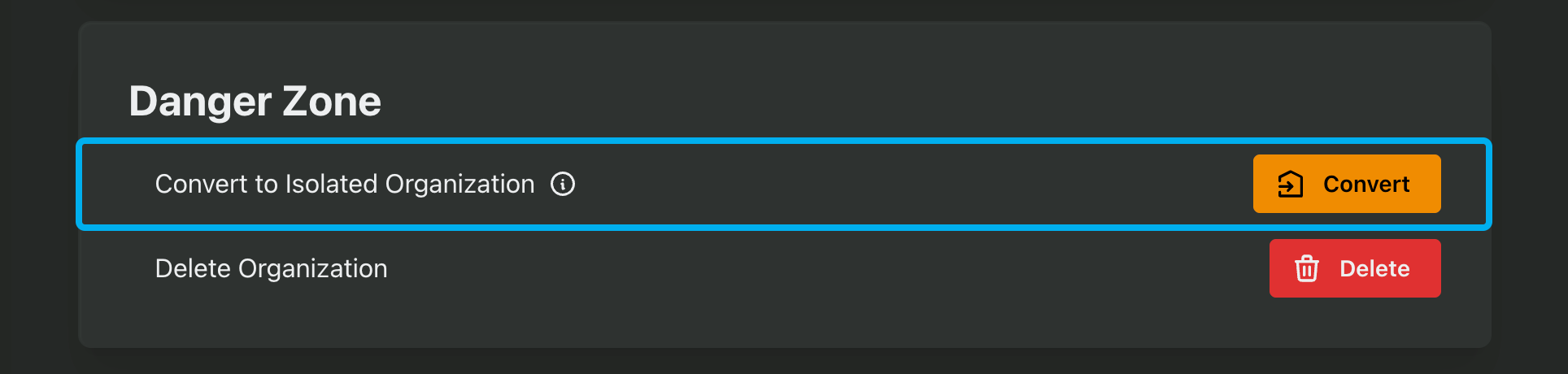
You can take any organization and convert it to an isolated org in the PropelAuth Dashboard or programmatically via the API.
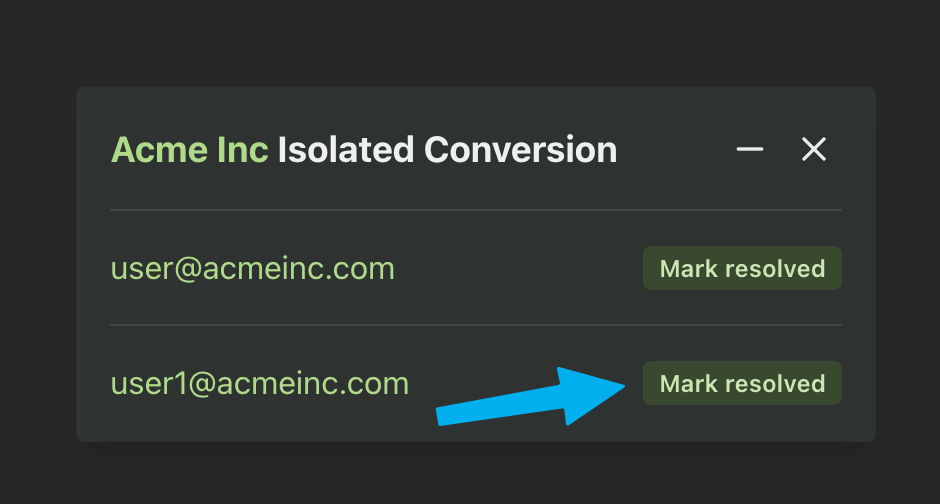
This operation will fail if any of the users are in more than one organization currently, since that violates the main isolation rule. In the dashboard, we’ll provide a list of users that are blocking the conversion so you can fix them:
When Would You Actually Need This?
Two scenarios come up most often.
The first is overlapping users across organizations that need to stay separate. Imagine you're building a platform where the same person legitimately needs different accounts for different organizational contexts — maybe they work for two subsidiaries of the same parent company, each with its own compliance domain. Standard orgs would merge them into one identity. Isolated orgs keep them distinct. If you've ever had to maintain separate Google Workspace accounts for different clients or employers (each with its own admin policies and data boundaries), you've experienced this problem firsthand.
The second is simplifying Enterprise SSO. Normally, PropelAuth includes safeguards like email confirmations for users logging in outside an org's primary domain. With isolated orgs, those guardrails become unnecessary because the customer's IdP is the single source of truth for membership. This makes onboarding large enterprise customers smoother and gives them the level of control they expect.
Choosing the Right Level
Here's a quick way to think about which level fits your situation:
Standard organizations work when your users have a single identity and your customers are comfortable with standard, logical separation. This is the GitHub/Slack model, one user, zero/one/many orgs, and it covers the vast majority of SaaS products.
Isolated organizations work when you need user-level separation within a single product, especially for enterprise customers who manage their own identity infrastructure and need guarantees that their users can't leak into other parts of your system.
As a third option, separate projects work when you need complete independence between environments: different auth configs, different policies, different everything. This is for fundamentally distinct deployments, the way a company might run entirely separate product stack just for a single customer.
The good news is that you don't have to choose just one. Standard orgs and isolated orgs coexist within the same project, so you can offer flexible multi-org access to your smaller customers while giving enterprise clients the hard isolation they require. And if a customer's needs evolve, you can convert a standard org to an isolated one through the dashboard or API.
You can start with the simplest model that meets your requirements, and escalate isolation only when the use case demands it.