Announcing Enterprise MCP
We just launched Enterprise MCP, which lets your customers manage access to your MCP server through tools they already use, like Okta and Microsoft Entra.
Your customers already manage their employees' access in their identity provider. With Enterprise MCP, they can manage access for their employees' AI agents there too. Their IT team can decide which employees can connect AI assistants to your product and what those assistants are allowed to do. It builds on Enterprise SSO and SCIM, connecting the groups they already manage to your MCP scopes.
And just like our SSO and SCIM setup flows, your customers get step-by-step guides tailored to their identity provider, walking them through the configuration on their side.
Here's what that looks like in practice:
You can find more information in our Enterprise MCP docs, but if you want to learn more about why we built it this way, stick around!
Role-based MCP support
PropelAuth is an auth provider built for B2B companies, and our MCP support is no exception. When a user connects an AI assistant to your product, the data they want to access often belongs to a company. They might even belong to several companies, with different roles in each.
That's why we support organization scopes. The user chooses which organization they're connecting, and consents to the agent accessing resources within that organization.
Scopes are a really useful way to control what an AI agent can do. You can let it read a project, update a support ticket, or view billing information, with a separate scope for each capability. Your MCP server checks the scopes granted to the agent before allowing it to use the corresponding tools.
You can also choose which roles are allowed to grant each scope. For example, someone in Engineering might be allowed to connect an agent that reads the codebase, while access to financial data is reserved for Management. Those restrictions show up on the consent screen:
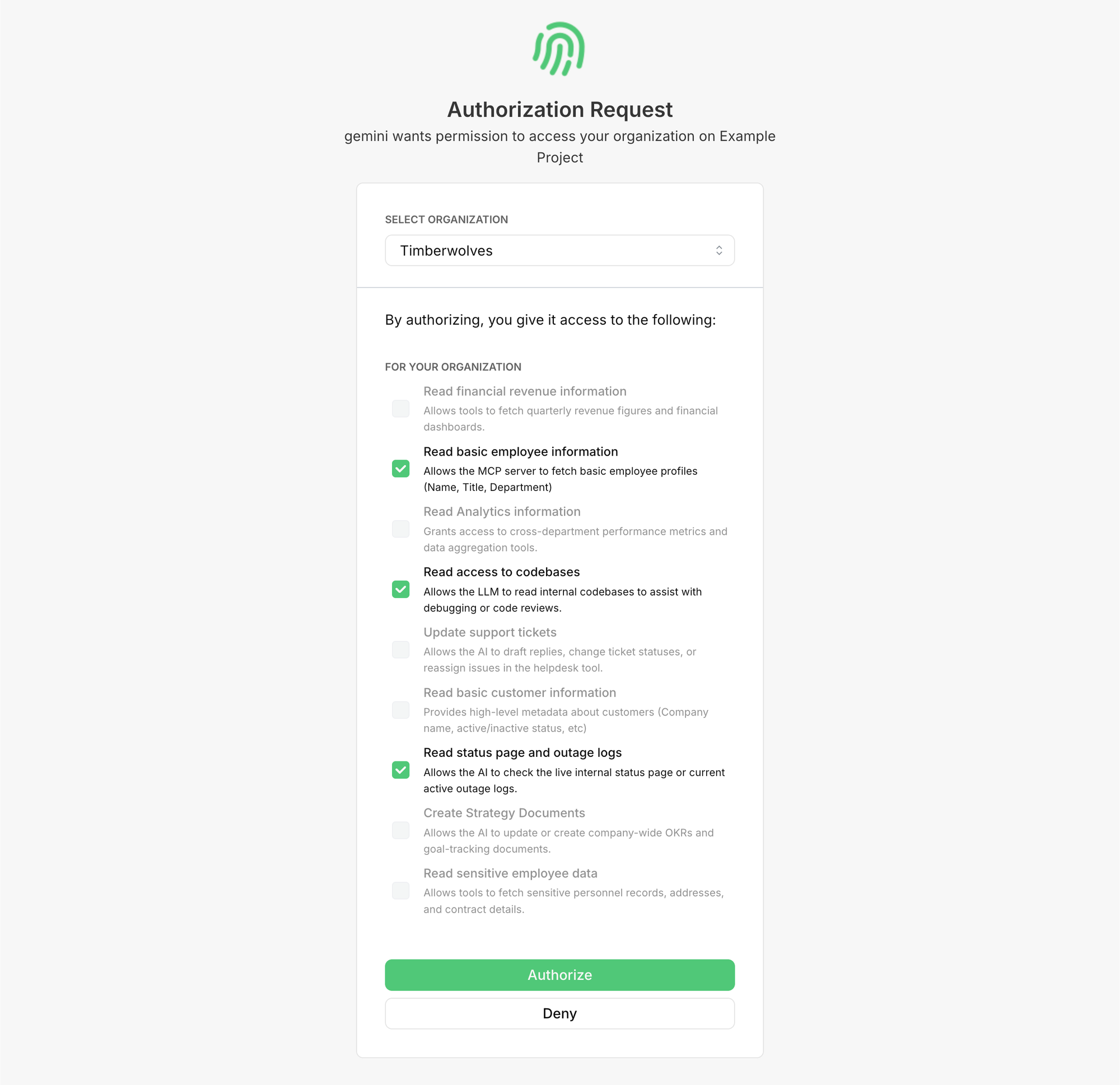
Those roles can come from your customer's identity provider, too. Our self-serve Enterprise SSO and SCIM guides walk their IT team through sending roles to PropelAuth. Their IdP determines the employee's role, and that role determines which scopes they can grant to an AI agent.
For a lot of customers, that's exactly what they want.
Enterprise MCP: when agents need different permissions
The edge cases show up when an employee's application access and their agent's access need to differ.
Your customer's roles already describe what their employees can do in your product. Reusing those roles for AI access is a good starting point. But being comfortable with a person taking an action doesn't always mean you're comfortable with an agent taking that action for them.
For example, your customer might want:
- Contractors to use your application, but not connect AI agents at all.
- Support staff to update customer records themselves, while only allowing their AI assistants to read those records.
You could try to represent every combination with another application role. That gets awkward pretty quickly, especially when each customer has a different policy for AI.
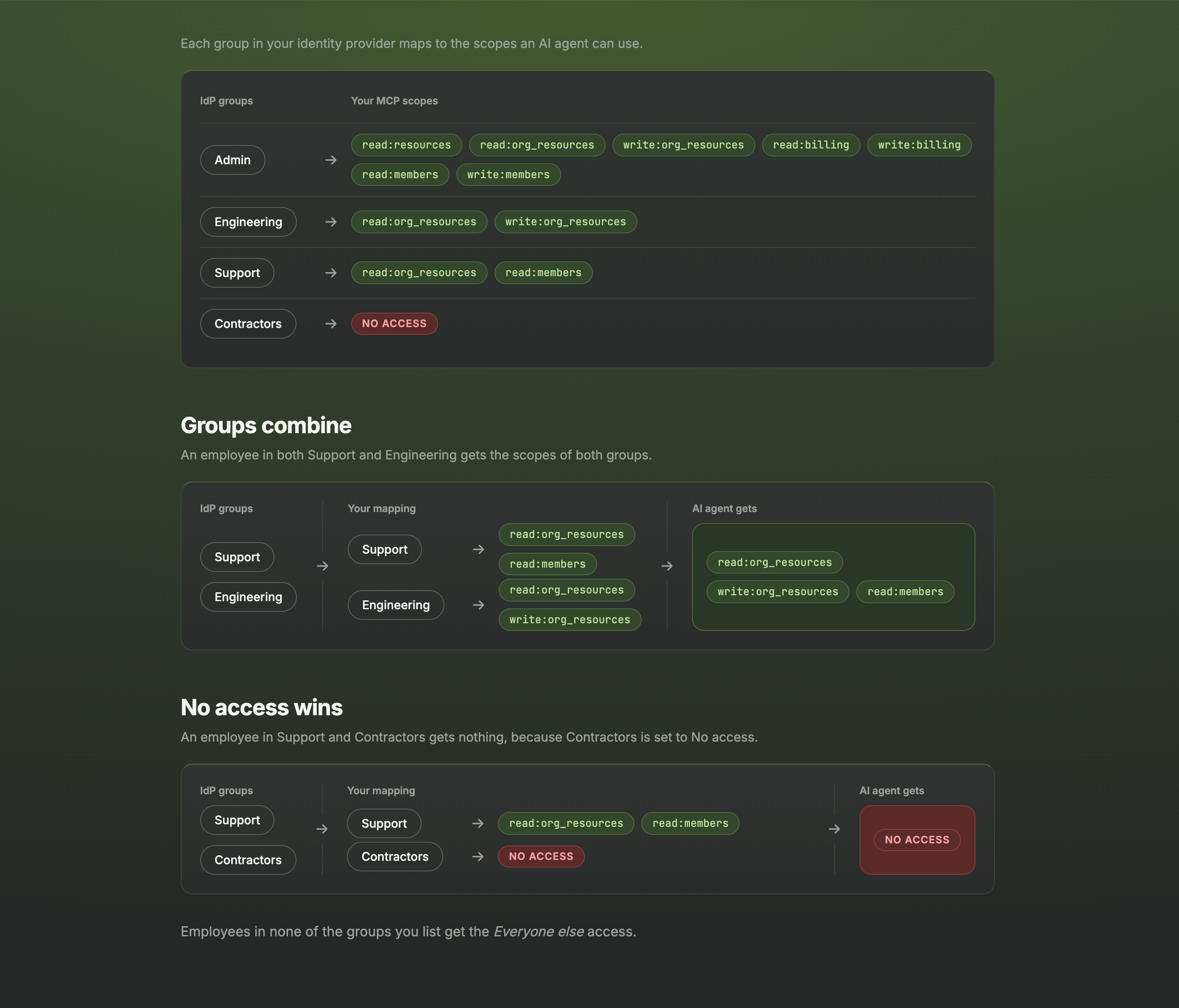
Enterprise MCP lets your customers map their IdP groups directly to MCP scopes. They can use the normal role-based scopes for most employees, give a particular group a specific set of scopes, or set a group to No access. Their application roles can keep describing what people are allowed to do, while these mappings describe what their agents can do.
Here's how that looks for an employee connecting an assistant. The scopes are marked Set by your identity provider, and the employee can grant read access to projects, but can't grant permission to manage them:
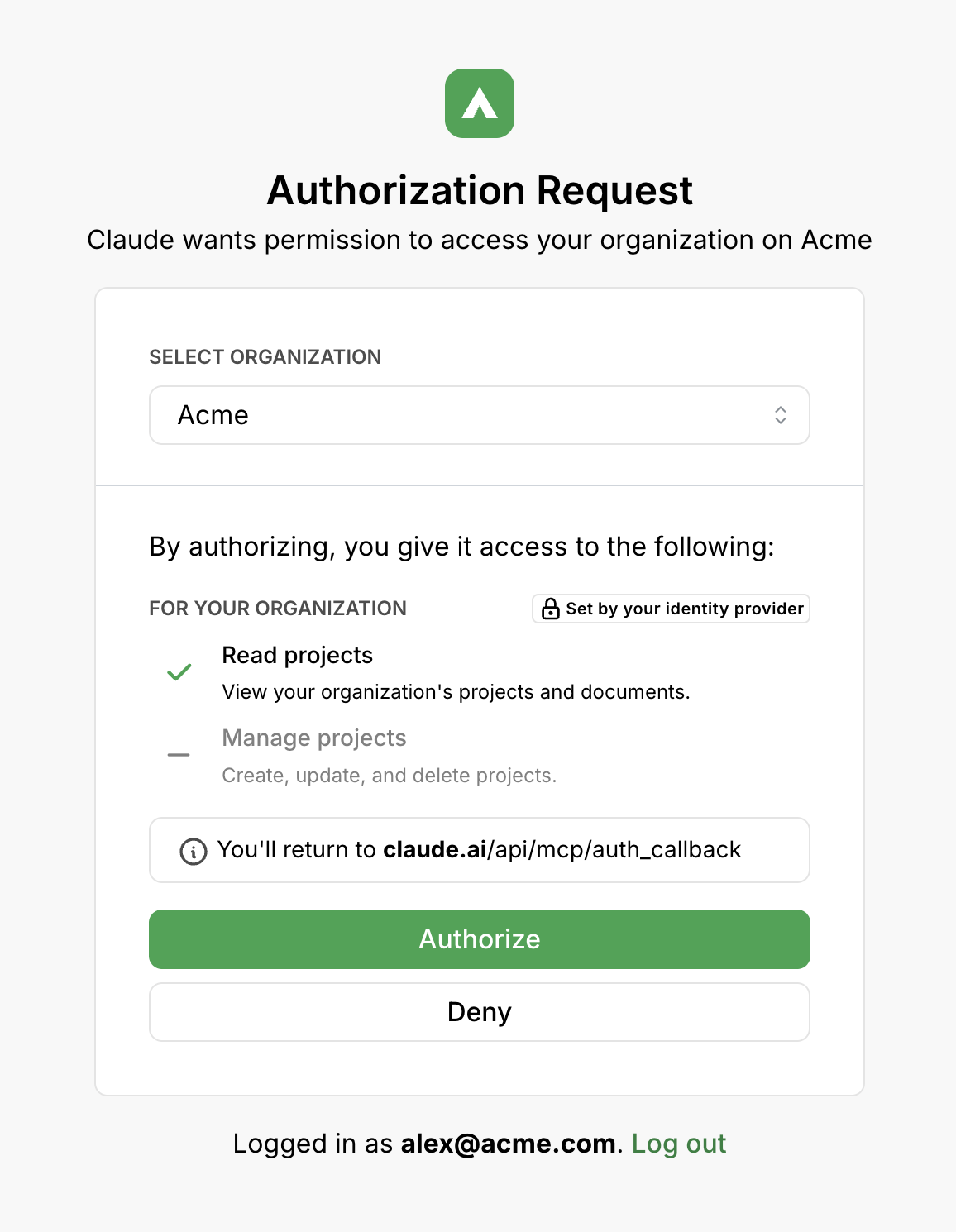
The mappings also handle people who belong to multiple groups. Their scopes combine, but No access wins. A contractor who is also in Engineering still can't connect an agent if the Contractors group is mapped to No access.
One detail matters when someone changes groups: with Enterprise SSO, PropelAuth picks up the change the next time they log in. With SCIM, it updates their available MCP scopes as the group change is provisioned. Your customer can choose which connection supplies the groups if they have both enabled.
IdP and MCP-client agnostic
For the technical folks, you may have been following Cross-App Access (XAA) and ID-JAG. This work gives enterprise identity providers a more direct role in authorizing access between applications, including MCP connections. We're excited about that direction.
The catch is adoption. These flows need support from the identity provider and the MCP client, and you can't assume both sides have it. Identity infrastructure tends to move slowly, and your customer may have very little say in when their provider adds a new capability.
We wanted customers to be able to manage agent access with the tools they already use. Enterprise MCP builds on their existing SSO or SCIM connection, and works with the MCP clients that already work with your server. The IdP supplies group membership, PropelAuth uses the mappings to determine the available scopes, and the MCP client goes through its existing OAuth flow.
That means your customer's IT team can set a policy like "Contractors can't connect agents" today, using the same groups they already maintain. They don't have to wait for their identity provider and every AI tool their employees use to adopt a new authorization flow.
Get started with Enterprise MCP
Enterprise MCP is available on the Growth and Growth Plus plans for $50 per connection. To get started, enable Enterprise MCP from the organization's Enterprise SSO tab in the PropelAuth dashboard. Your customer can then configure their group mappings through their Organization Settings page or SSO setup link, with a guide for their provider. The Enterprise MCP docs cover the setup and mapping rules.