Introducing Member Audit Logs
Give your customers visibility into their teammates' account activity with Member Audit Logs.
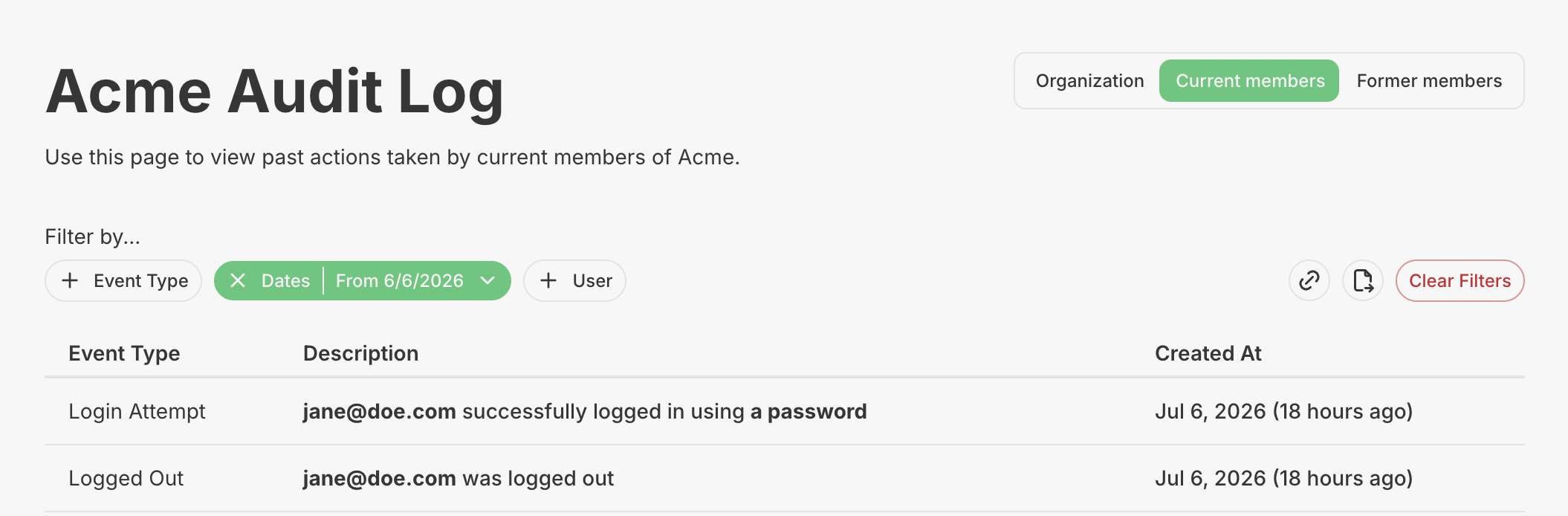
Your customers ask for audit logs because they want answers, not just data. Who logged in last Tuesday? Did someone actually reset their password, or is that a support ticket waiting to happen? Did the new hire ever confirm their email? Up until now, if you had customer facing audit logs turned on, your customers could only see the organization side of that story. Now they can see the member side too.
If you've already configured your PropelAuth hosted pages to include Organization Audit Logs, you can now turn on Member Audit Logs as well. By default, customer facing audit logs cover organization-specific events, things like Enterprise SSO configuration changes, MFA restrictions, and inviting users to the org. These are useful for understanding how the organization itself is being configured and managed, but they don't say much about what individual members are actually doing day to day.
That's where Member Audit Logs come in. They go a level deeper, surfacing activity tied to the individual members of an organization, such as login events, password changes, and email confirmations.
Your customers can view these logs for both current and former members of their org, which is especially handy when someone leaves the team and questions come up after the fact.
That said, the logs are scoped to what happened while someone was an active member. If a user leaves the org, any activity after that point won't show up, so your customers get a clean historical record without the risk of pulling in unrelated activity from a user's other organizations.
This is another way to give your security-conscious customers the oversight they're asking for, without them having to file a support ticket every time they want to know who logged in, and when. It's a small addition, but for teams that take security and compliance seriously, that extra layer of visibility can make a real difference.
Ready to give it a try? Head over to the Organization Settings page in the PropelAuth dashboard, click the cog icon next to Organizations can view audit logs, and turn on Organizations Can View Member Audit Log.