Introducing PropelAuth Session Management
Knowing who's logged in, from where, and being able to do something about it shouldn't require digging through a database. Today, we're making that information a first-class part of your PropelAuth dashboard.
We're excited to announce Session Management, a new feature that gives you and your users full visibility into active sessions, along with the ability to end them remotely.
What you get
With Session Management, both you and your users can see every active session tied to an account, including the device's user agent, IP address, country, and when it was last active.
And it's not just visibility. Sessions can be ended remotely, right from:
- The PropelAuth hosted pages, so your users can manage their own sessions
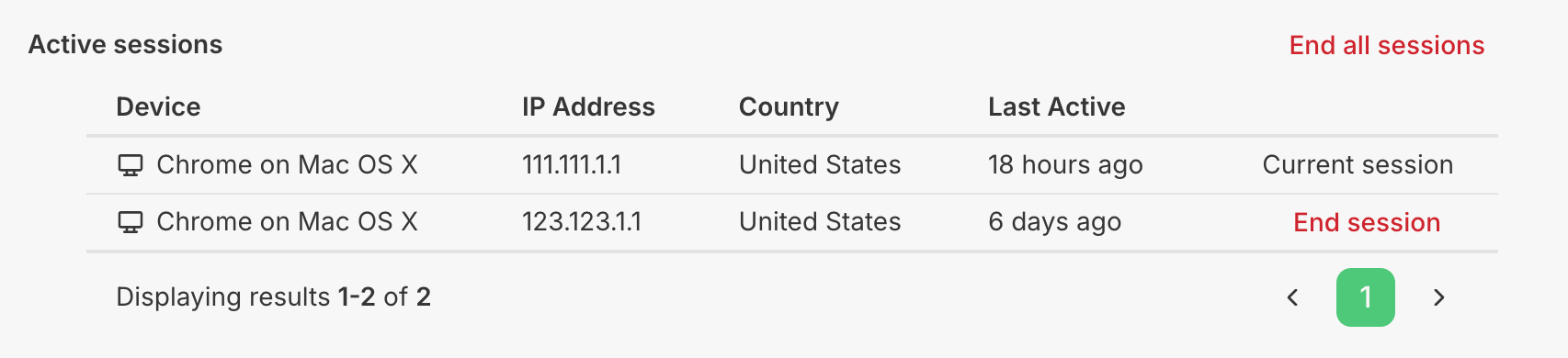
- The PropelAuth dashboard, so your team can step in when a user needs help, a device is lost, or a security review calls for it
This is the kind of feature that quietly matters a lot more once you're selling to bigger customers. Security questionnaires love to ask about session visibility and remote logout, and now you can just say yes.
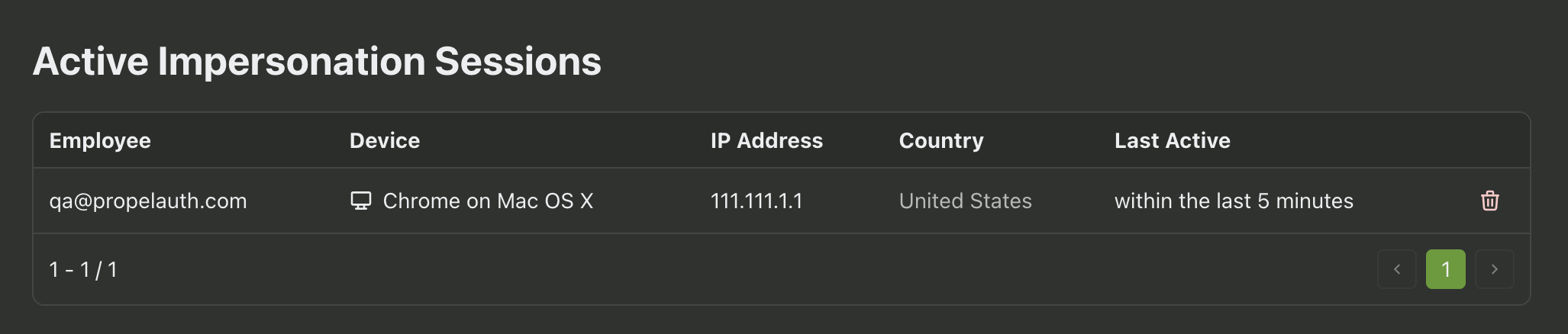
If your team uses User Impersonation, this extends there too. Active impersonation sessions now show up in the PropelAuth dashboard alongside regular user sessions, so you always know who's currently viewing your product as one of your users.
Learn more
You can find the full rundown, including how session data is surfaced on the hosted pages and dashboard, here.