Ping Identity Support: SAML, OIDC, and SCIM
PropelAuth now supports Ping Identity across all three of the standards that matter most for enterprise customers: SAML, OIDC, and SCIM.
Ping is one of the most established identity providers in the enterprise, and it's a common requirement for companies in finance, healthcare, and other regulated industries. If you're selling B2B SaaS upmarket, "Do you support Ping?" is exactly the kind of question that shows up in a security questionnaire right when a deal is heating up. Now the answer is yes, with full self-service setup and no changes to your code.
What SAML, OIDC, and SCIM actually do
These three acronyms come up constantly in enterprise auth, and they're easy to conflate. Here's the short version.
SAML (Security Assertion Markup Language) is the older and most widely deployed standard for enterprise single sign-on. It lets your customer's employees log into your product using their existing work account in their identity provider, with no separate password to manage. When someone signs in, their IdP vouches for who they are and passes along their identity to your app. SAML is the default expectation on most enterprise security checklists.
OIDC (OpenID Connect) does the same job, authentication, but it's the newer, simpler standard, built on top of OAuth 2.0. It's increasingly common in modern IdP setups, and supporting it means an organization can connect using whichever protocol their team already runs on, rather than being forced into one.
SCIM (System for Cross-domain Identity Management) is a different layer entirely. Where SAML and OIDC handle who can log in, SCIM handles who exists in your app. It keeps your user data in sync with the customer's directory automatically: when an employee is added, their account is created; when their details change, those updates flow through; and when an employee leaves, their access is revoked immediately, without anyone filing a ticket. That last case, instant deprovisioning, is the one customers tend to care about most. SCIM sits on top of SAML or OIDC, so once a user is provisioned, they log in with whichever of the two their organization has configured.
Together, the three give your enterprise customers the full lifecycle: secure login through their IdP, and automatic provisioning and deprovisioning tied to their directory.
Set up by your customers, not your engineers
As with every IdP we support, the Ping Identity integration is built for self-service. Your customers walk through a guided, Ping-specific setup flow that tells them exactly what to enter and where, and collects the details PropelAuth needs to establish the connection on their behalf. No more back-and-forth over whether the ACS URL is the same as the Reply URL is the same as the Single Sign-On URL.
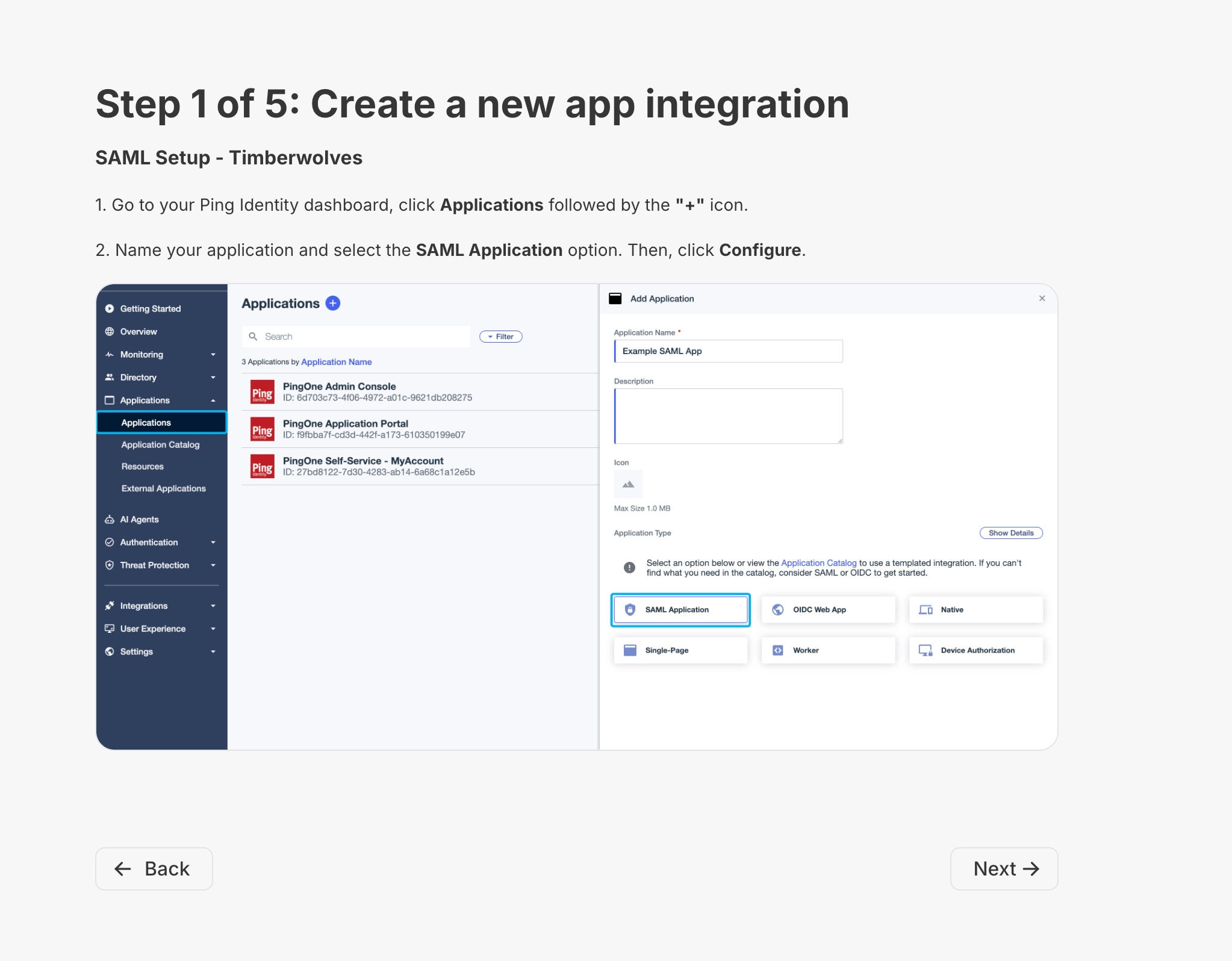
And because SAML, OIDC, and SCIM are deeply integrated into PropelAuth's organization model, your code doesn't change at all. These are implementation details of how a given organization manages its members. Any logic you've already written around organizations, roles, and permissions keeps working, whether a customer logs in with a password, a magic link, or their Ping account, and whether their users are provisioned by hand or synced automatically over SCIM.
Don't see your customer's IdP? Use a generic connection
Ping joins a growing list of providers we support directly, alongside Okta, Microsoft Entra ID, Google, OneLogin, JumpCloud, Duo, and Rippling.
But you're not limited to that list. PropelAuth also offers generic SAML and generic OIDC connections that work with virtually any standards-compliant identity provider. If a customer shows up with an IdP we haven't built a dedicated guide for yet, you can still get them connected, with the same organization model and the same "no code changes" guarantee.
Get started
If you already have Enterprise SSO enabled on your project, your customers can start connecting Ping Identity today from their organization settings. If you're setting this up for the first time, head to the Enterprise SSO / SCIM page in your PropelAuth dashboard. For the full walkthrough, see our Enterprise SSO (SAML / OIDC) and SCIM docs.
As always, if you run into anything or have questions about a specific customer's setup, reach out at support@propelauth.com. We're happy to help.