Scoped Backend API Keys in PropelAuth
PropelAuth backend API keys now support granular permission scopes, giving you precise control over exactly what each key is authorized to do within your environment.
Instead of issuing one all-powerful credential to every service that needs to talk to PropelAuth, you can now create narrowly scoped keys that carry only the API key permissions each integration actually requires. A data pipeline that reads user records gets Read Users and nothing else. An onboarding service gets Create Users and Create Organizations. A support agent gets Read Users and Send Email Confirmations. Every key does its job and nothing more.
This matters for a few reasons. It reduces your attack surface: a leaked or compromised key can only do what it was scoped for. It makes auditing easier: the name and permissions on a key tell you exactly which service it belongs to and what it can touch. It follows the principle of least privilege - a foundational security practice that applies as much to auth infrastructure as it does to databases or IAM policies. And it gives you the building block you need to safely hand credentials to automated systems (including AI agents) without worrying that a bug or a bad prompt could cascade into something catastrophic.
For teams running AI agents that interact with their auth infrastructure, this is especially significant. Scoped backend API keys are now the right way to give agents the access they need while enforcing a hard boundary on what they can do, by design rather than by policy.
Four Key Types
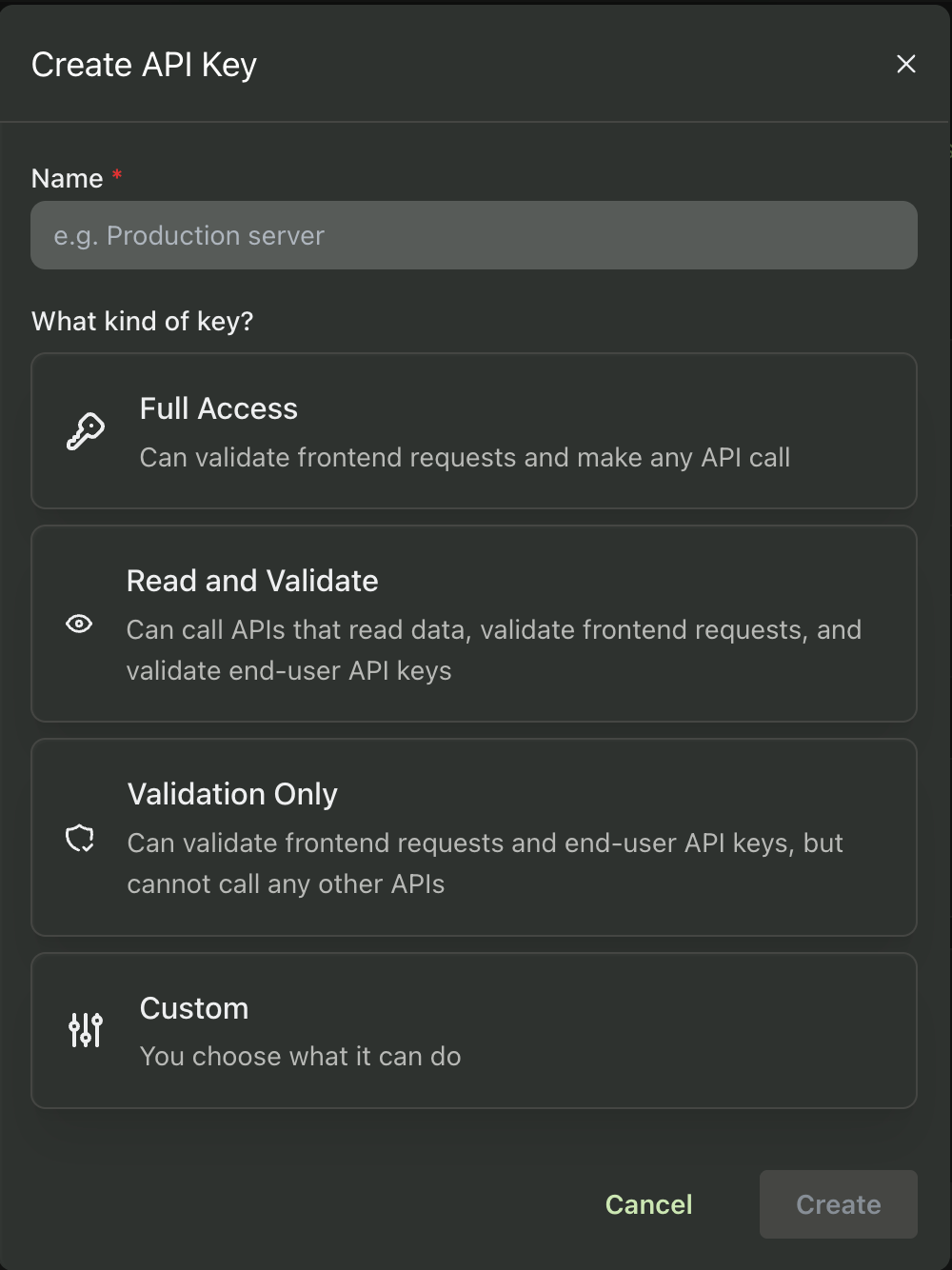
When creating a backend API key, you start by choosing a key type:
Full Access: Can validate frontend requests and make any API call. Use this when a service genuinely needs broad access to your PropelAuth environment.
Read and Validate: Can call APIs that read data, validate frontend requests, and validate end-user API keys. The right default for services that consume data but don't need to modify anything.
Validation Only: Can validate frontend requests and end-user API keys, but cannot call any other APIs. Good for edge deployments or lightweight services that only need to verify tokens.
Custom: You choose exactly what this key can do, picking individual permissions across each category.
Custom Scopes, Broken Down by Category
When you select Custom, permissions are organized into six categories, each expandable to reveal individual toggles. Users and Organizations are the most granular, covering everything from reading and creating records to updating passwords, managing MFA status, sending email confirmations, and deleting accounts. Authentication covers login-related settings, SSO & SCIM handles enterprise directory sync and single sign-on configuration, and End-user API Keys lets you control whether a service can create, validate, or revoke the API keys your own users generate. Misc covers a small set of additional utility operations.
The dashboard shows a running count per category (e.g. 3 / 13 for Users) so you always have a clear picture of how much access a key carries.
Granular API Key Scopes and AI Agents
One of the most compelling use cases for scoped backend API keys is granting them to AI agents, and it's worth dwelling on why.
As AI agents take on more autonomous tasks in B2B SaaS products, they increasingly need to interact with auth infrastructure directly. An onboarding agent might provision new users. A support agent might look up account details or trigger a password reset. An ops agent might manage organization membership. All of these require a real PropelAuth backend key.
The problem with giving an AI agent a Full Access key is the same problem you'd have with any automated system: if something goes wrong (a bug, a prompt injection attack, a compromised context window) a broadly scoped credential can do a lot of damage. An agent that only needs to read user data has no business being able to delete them.
Scoped keys solve this cleanly. You define the exact boundary of what an agent is authorized to do at the credential level, not just in your application logic. A support agent gets Read Users and Send Email Confirmations. An onboarding agent gets Create Users and Create Organizations. If the agent misbehaves or gets manipulated, the blast radius is constrained by what the key itself is capable of.
This pairs naturally with PropelAuth's MCP authentication support. When you build an MCP server backed by PropelAuth, you can give that server a key scoped only to the operations it needs to perform. Even if an AI client is granted access to your MCP server, it can't trigger actions that the underlying key isn't permitted to make, adding a second layer of enforcement beyond whatever scope restrictions you've configured at the MCP level.
The combination of MCP scopes controlling what an AI client can request and backend API key scopes controlling what your server can actually execute gives you defense in depth for AI agent authorization.
How to Create a Scoped Backend API Key
- In your PropelAuth dashboard, navigate to Backend Integration and select your environment (Test, Staging, or Prod).
- Click Create New API Key.
- Give it a descriptive name that reflects its purpose:
support-agent-readonly,onboarding-agent, ororg-management-service. - Select the key type. Choose Custom for fine-grained control.
- Expand each permission category and check only the permissions this key needs.
- Click Create.