What is Dynamic Client Registration?

Dynamic Client Registration (DCR) is an extension of OAuth that allows OAuth clients to be created programmatically. It wasn’t a very popular extension until recently, when the Model Context Protocol (MCP) spec brought it back into the conversation as a recommended option (though newer versions of the spec are instead emphasizing alternatives like Client ID Metadata Documents).
Before we talk about dynamic client registration, let’s just talk about client registration for OAuth in general. The word client is unfortunately pretty ambiguous, so when we say client we specifically mean an OAuth Client.
What is an OAuth Client?
An OAuth client is just the application or tool that’s asking to access something.
It’s not the user and it’s not the login system. It's the thing that says: “With the user’s consent, give me permission to call an API on their behalf.”
As an example, let’s say you’re using Claude Desktop, and you want it to connect to your Google account to read your calendar.
In that situation, Claude Desktop acts as the OAuth client: it’s the app requesting access.
Google needs to get your consent to make sure you are ok with Claude Desktop accessing your calendar.
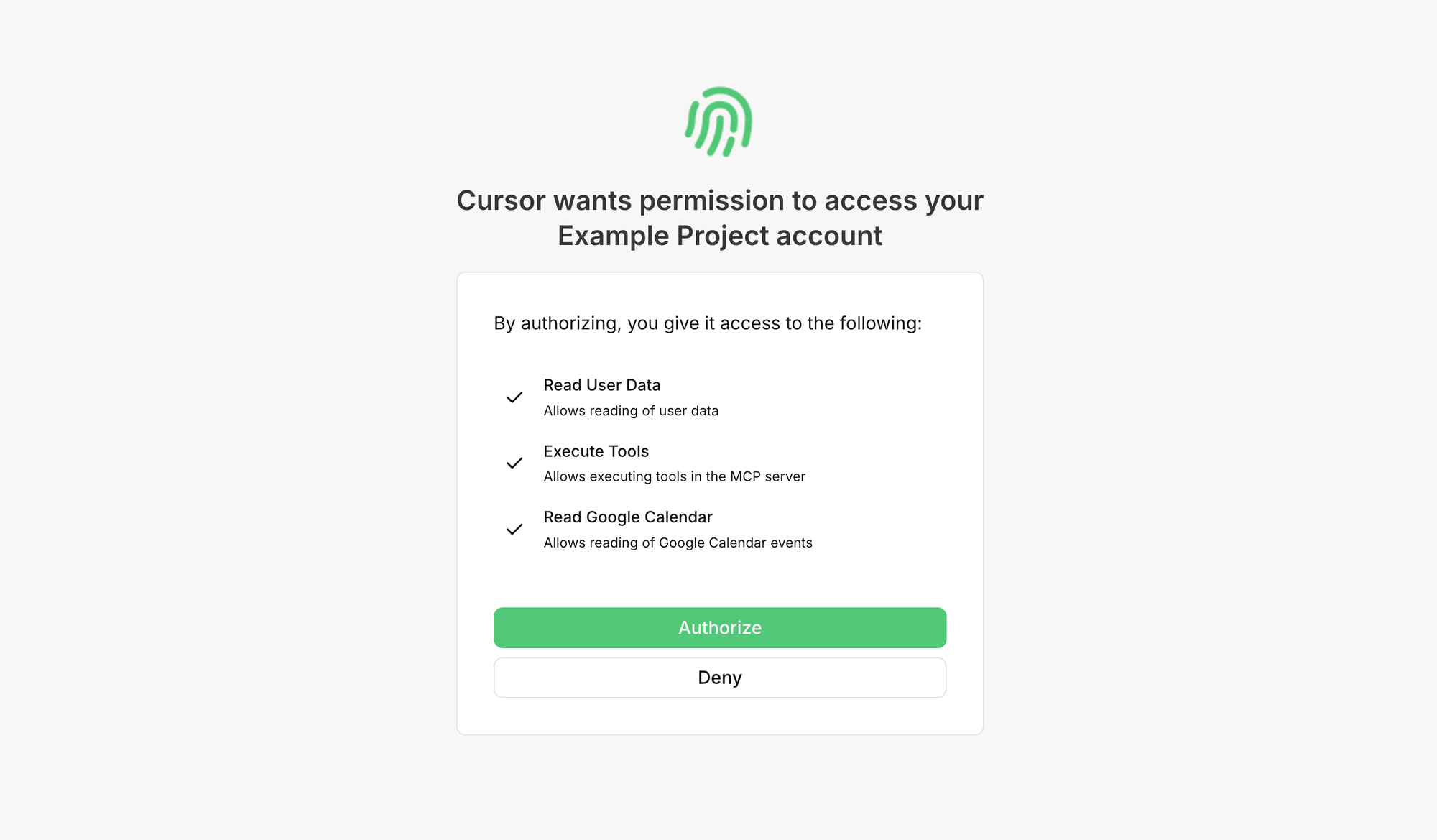
After you consent, Google redirects back to Claude Desktop with a one-time code. Claude Desktop swaps that code for a token it can use to call the Google Calendar API.
For Google to do that safely, it needs to know which app is asking and what rules to apply. That’s where client registration comes in.
What is Client Registration?
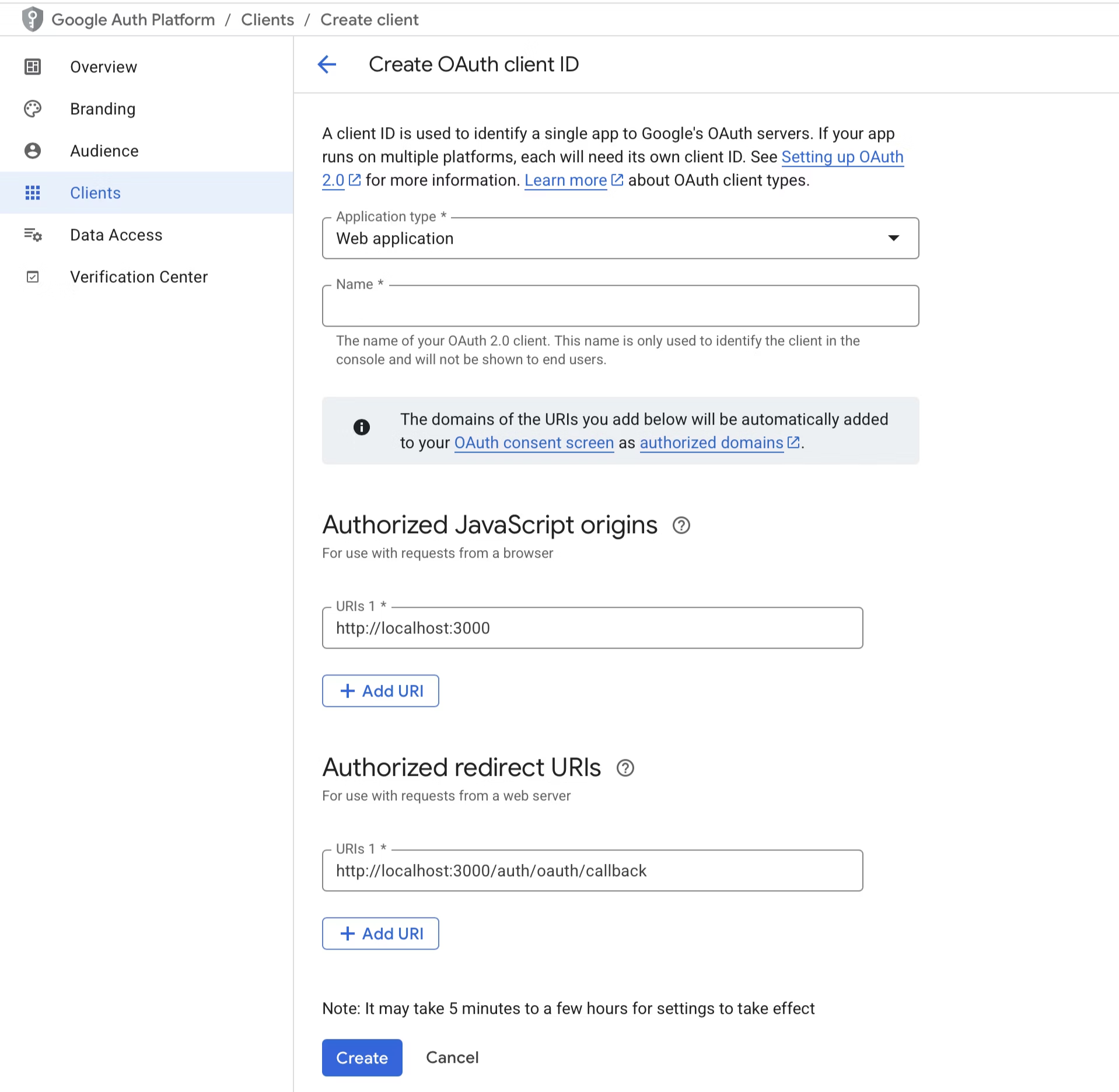
Unsurprisingly, this is where you create an OAuth client. OAuth clients have some settings that need to be configured, like:
- Its name / logo, so we can present that to the user on the consent screen
- Redirect URI(s), so we can make sure we are sending the user back to the right place.
- In practice, redirect URIs often look like one of these:
- An HTTPS callback (e.g.
https://claude.ai/...orhttps://claude.com/...) - A custom scheme (e.g.
cursor://...) - A localhost loopback callback (e.g.
http://localhost:<port>/callback)
- An HTTPS callback (e.g.
- In practice, redirect URIs often look like one of these:
- Which OAuth flows this client can use? OAuth comes in a lot of flavors, but not all of them are relevant and some of them are essentially deprecated.
- Is it a confidential client or a public client? This has implications on whether it can store secrets.
When you register an OAuth client, you are specifying some/all of these settings. Commonly, you’ll find that this process is manual. Here, for example, is the UI for registering an OAuth client with Google:
What is Dynamic Client Registration?
Dynamic Client Registration is just an API that allows you to create OAuth clients programmatically. Instead of using the UI that you see above, you’d make a POST request to a /register endpoint with a JSON body like this:
{
  "client_name": "Claude Code",
  "redirect_uris": ["http://localhost:3000/auth/oauth/callback"],
  "grant_types": ["authorization_code"],
  "response_types": ["code"],
  "token_endpoint_auth_method": "none"
}
If accepted, the authorization server will respond with the newly created client information, including a client_id (and depending on server policy, sometimes other fields too):
{
  "client_id": "abc123",
  "client_name": "Claude Code",
  "redirect_uris": ["http://localhost:3000/auth/oauth/callback"]
}
Why is DCR useful for MCP?
The Model Context Protocol (MCP) recommended DCR for a few reasons. The most obvious is that it’s an easier onboarding flow for users.
If a user wants ChatGPT to connect to an external product:
- With manual registration, the user has to go to the external product first, enter redirect URIs that ChatGPT provides, create & copy over a client ID, and then go through the consent flow.
- With dynamic client registration, the user can just enter the external product’s MCP URL and they’ll be taken through the consent flow.
These extra manual steps compound as you connect to many external products (e.g. Slack, Google, Github, etc.).
Another reason is that, in an MCP world, people have way more clients than they did for other use cases. As a developer, you might have Cursor and Claude Code and ChatGPT and OpenCode and {insert new flavor of the month}, and they don’t necessarily share credentials.
The problems with DCR
Unfortunately, DCR isn’t without its issues.
That /register endpoint we mentioned before? You'll often find that there's no authentication required for it, because you have a chicken or egg problem getting authentication for it. This can lead to spam client registrations, phishing attempts, database-write DoS risk, and just general noise.
To mitigate this, you’ll want to make sure you are rate limiting client creations and garbage collecting unused / old clients. You’ll also want to be strict about what you accept during registration (especially redirect URIs) since a permissive redirect policy can turn DCR into a phishing enabler.
In addition, you also need to treat these DCR clients as untrusted. If a DCR client requests access to anything for a user, you must always ask that user’s consent, no exceptions.
While there are ways to restrict the /register endpoint (e.g. you can require an initial access token), not every client supports them and they often add enough overhead that you might’ve just wanted to use the safer manual client registration instead.
When should you offer DCR?
In the world of Dynamic Client Registration vs manual, the big question is ease of onboarding.
With DCR, your users will just enter a URL, login, and be redirected to a consent screen. With manual registration, they first need to use a UI to register a client with you.
If you read the manual process and thought… that’s really straightforward, great! Manual client registration is a perfect option for you.
If you read that and thought… my users might get confused with really any registration UI, that’s also reasonable. Dynamic client registration might be the better option. You just need to be aware that you’ll need to add more protections to your registration endpoints.
What about Client ID Metadata Documents?
There’s now a third option, and it changes the tradeoff above. Newer versions of the MCP spec point at Client ID Metadata Documents (CIMD), where the client’s ID is a URL that hosts its own metadata (illustrative: https://acme-ai.example/oauth-client.json). Instead of the client POSTing to your /register endpoint and you storing whatever it sent, your authorization server fetches that URL and reads the client name and redirect URIs straight from the source.
That removes the part of DCR that causes the most worry. You are not running an unauthenticated write endpoint, the client’s identity is anchored to a domain someone has to control rather than to a name it picked for itself, and there is no pile of abandoned client records to garbage collect.
What doesn’t change is consent. A CIMD client is still an application you didn’t vet, so the rule from the last section holds: always ask the user, show them what is being requested, and let them say no.
The catch is coverage. A client only works this way if it has adopted CIMD, and not all of them have. For now this is an and, not an or: support CIMD for the clients that speak it, keep DCR for the ones that don’t.
PropelAuth supports both, each behind a toggle in your project’s MCP settings. If you’re setting this up today, we’d turn on CIMD and leave DCR enabled for the clients that haven’t caught up. The MCP Authentication docs cover both paths.
Making manual client registration simpler
The process of manually registering a client is almost straightforward. The one tricky case is the redirect URIs - since users will likely not know what to enter there.
One of the things we built as part of PropelAuth’s MCP support is the ability to name your redirect URIs.
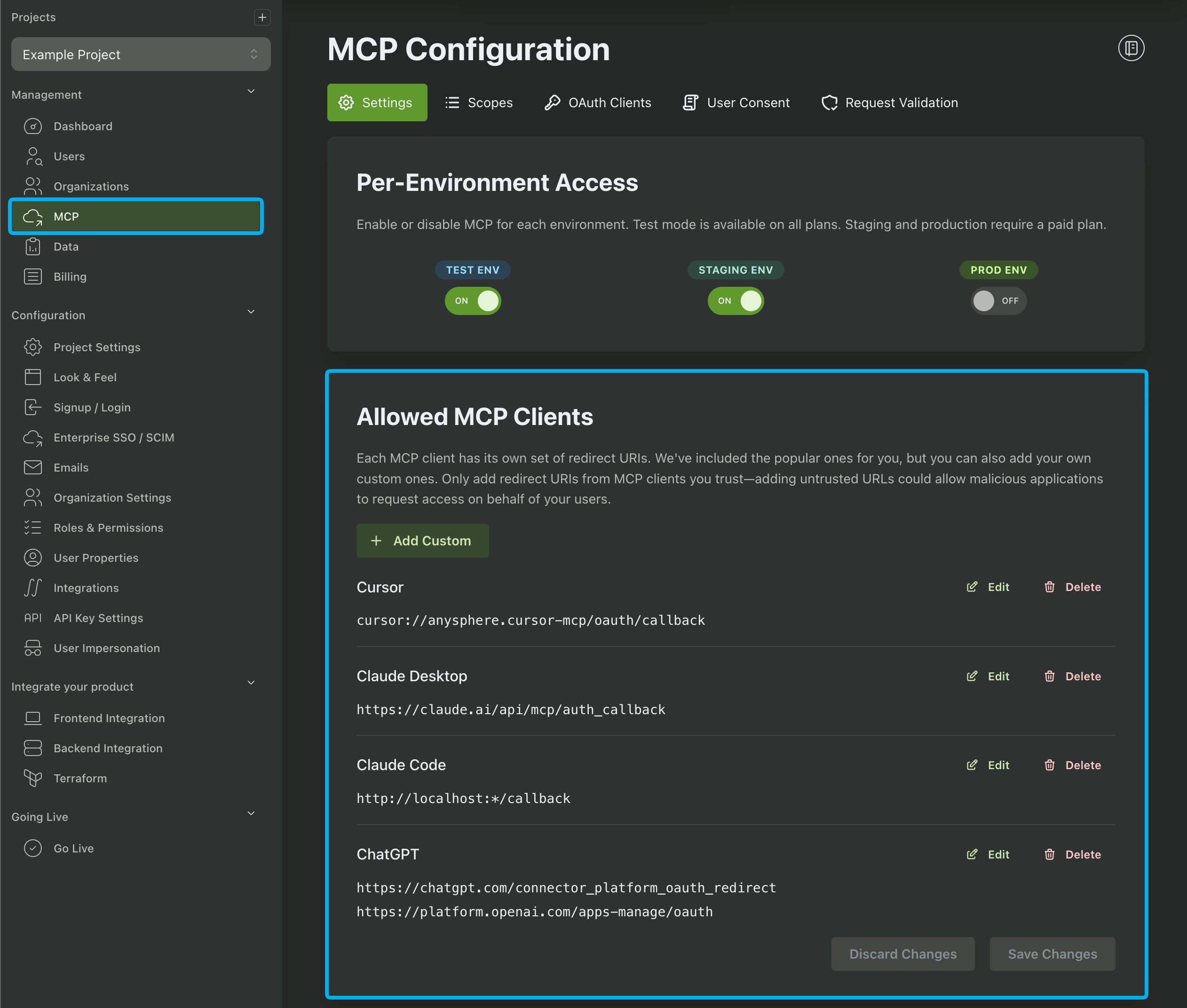
This means instead of entering:
cursor://anysphere.cursor-mcp/oauth/callback
the user can just select
Cursor
This helps to reduce most of the complexity from manual registration.
Summary
Dynamic Client Registration (DCR) is a way to create OAuth clients programmatically via an API instead of a UI.
- An OAuth client is the app asking for access (e.g. Claude Desktop), not the user and not the login system.
- Client registration exists so the authorization server knows what rules to apply (especially redirect URIs and allowed flows).
- DCR is useful in MCP-style onboarding because it can eliminate manual copy/paste setup and client ID creation steps.
- DCR shifts burden to server-side protections: if you support open registration, you need strong rate limiting, cleanup/GC, and strict validation (especially for redirect URIs).
- Always treat DCR-registered clients as untrusted and require explicit user consent for access.
- CIMD is the newer alternative: the client’s ID is a URL hosting its metadata, so there’s no open registration endpoint to protect. Client adoption is still uneven, so plan on supporting it alongside DCR rather than instead of it.