What is OIDC? OpenID Connect Explained (and How It Compares to SAML)
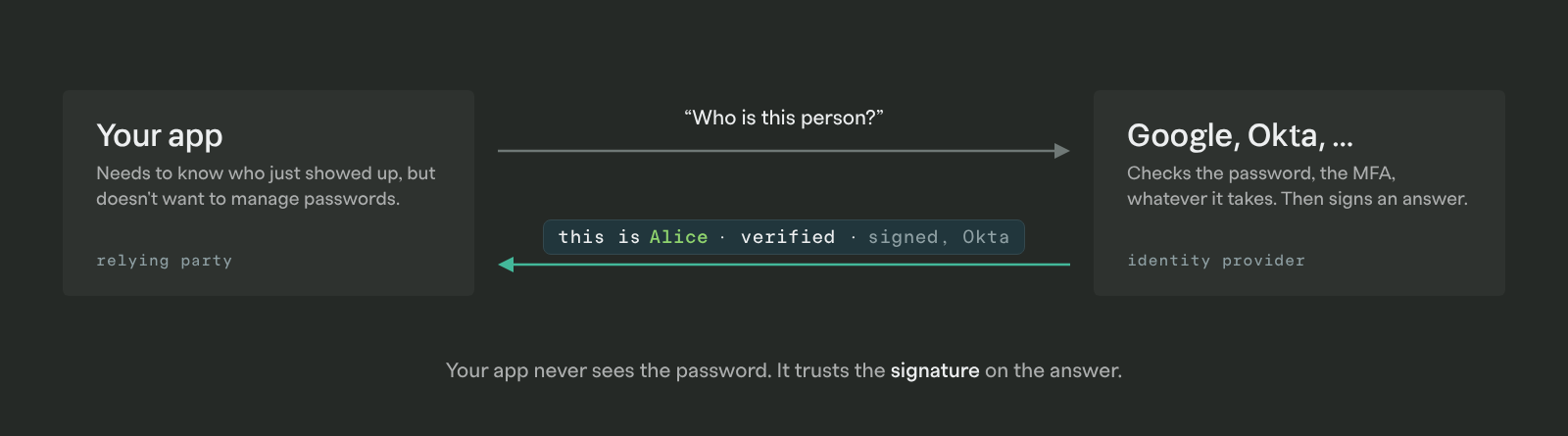
OIDC (OpenID Connect) lets your app send a user somewhere else to log in, like Google or Okta, and get back a signed answer to one question: who is this person?
It's the protocol behind nearly every "Sign in with Google" button. It's also one of the two protocols an enterprise customer means when they say "we need SSO." The other is SAML.
Most developers meet OIDC in two forms. The first is social login. When you add "Sign in with Google" to your app, a library handles OIDC for you, and you may never look at the protocol itself. The second is when a customer's IT admin asks whether you support "OIDC with Okta." Same protocol, but now the identity provider belongs to your customer, and you need to understand what's actually happening.
In this post we'll cover what OIDC is, walk through a login step by step, look at what's inside the token you get back, and compare it to OAuth 2.0 and SAML. By the end you should be able to tell a customer which one you support and why.
What Is OIDC?
Let's start off simple and we'll fill in the details after.
Imagine a bouncer who doesn't check IDs himself. When you walk up, he sends you next door to the DMV. The DMV checks your license and hands you a sealed note:
"This is Alice. We verified her. Good for the next hour. Signed, the DMV."
You bring the note back to the bouncer. He doesn't need to know anything about you ahead of time. He just needs to trust the DMV and recognize their signature.
That's OIDC. Your app is the bouncer (the spec calls it the relying party). The identity provider (the OpenID provider, or IdP) is the DMV. The sealed note is the ID token.
Now the precise version. OIDC is an open standard, published by the OpenID Foundation in 2014, that lets an application verify a user's identity by delegating the login to an identity provider. It isn't a standalone protocol. It's a thin identity layer on top of OAuth 2.0. It reuses OAuth's request-and-redirect flow and adds, above all, a token that says who the user is. That addition is the whole reason OIDC exists.
Wait, Isn't That Just OAuth?
Almost. OIDC is OAuth 2.0 plus one addition, and that addition is what turns an authorization protocol into a login protocol.
OAuth 2.0 was designed for authorization. It answers "is this app allowed to do X on the user's behalf?" Giving a scheduling tool read access to your Google Calendar is the textbook example. The tool gets an access token, which is a credential for calling Google's API on your behalf.
In practice, though, OAuth has been used for login for about as long as it has existed. "Sign in with Google" predates OIDC, and the way it worked was essentially this: get an access token, then use it to read the user's email address from Google. If Google says the token belongs to alice@acme.com, you log Alice in. That works, but every provider did it a little differently. The user-info endpoint, the field names, and the token format were all provider-specific, so each "Sign in with ___" button was its own integration.
OIDC standardizes the login part. It runs the same request and redirect as OAuth 2.0 but adds a scope called openid. In return, the IdP issues an ID token next to the access token. The ID token is always a JWT, and its claims (sub, email, name, and so on) mean the same thing at every provider. Instead of calling a provider-specific API to find out who logged in, your app verifies one token and reads the identity out of it.
| OAuth 2.0 | OIDC | |
|---|---|---|
| Designed for | Authorization: can this app access this resource? | Authentication: who is this user? |
| Token you get | Access token (for calling APIs) | ID token (for identifying the user), plus an access token |
| Token format | Up to the provider: an opaque string or a JWT | The ID token is always a JWT |
| How you learn who the user is | Call the provider's user-info API | Read the standard claims in the ID token |
| Discovery | Not standardized | /.well-known/openid-configuration |
Access tokens can be either opaque strings or JWTs, depending on the provider, and plenty of apps do look inside them. The point isn't that OAuth tokens are unreadable. It's that OIDC gives you a token whose format and meaning are the same everywhere, built specifically to answer "who is this?" If what you're building is login, use OIDC wherever the provider offers it.
How Does an OIDC Login Actually Work?
Let's make the actors concrete:
- Your team builds the app.
- Acme is your customer.
- Alice works at Acme.
- Okta is Acme's identity provider, set up by Acme's IT admin.
Alice opens your app and clicks "Sign in with SSO."
For OIDC authentication in a web app, the flow you should use is the Authorization Code flow. Here's what happens, in order:
- Your app redirects Alice to Okta. The redirect URL carries your app's
client_id, aredirect_urito come back to,response_type=code, ascopethat includesopenid(usuallyprofileandemailtoo), and randomstateandnoncevalues.statelets you tell a real callback from a forged one, andnonceties the ID token you get back to this specific request. - Alice authenticates with Okta. Password, MFA, whatever Acme's admin has required. Your app never sees any of it. If Alice already has an Okta session from earlier in the day, this step takes no time at all.
- Okta redirects Alice back to your app with a short-lived authorization code. It arrives as a query parameter on your
redirect_uri, along with thestateyou sent. Your app checks thatstatematches. - Your app exchanges the code for tokens. This is a server-to-server POST to Okta's token endpoint, authenticated with your
client_secret. Okta responds with an ID token, an access token, and optionally a refresh token. - Your app validates the ID token. Check the signature against Okta's published public keys, confirm
issis the Okta tenant you expected,audis yourclient_id,exphasn't passed, andnoncematches the one you sent. If all of that holds, thesubclaim is Alice's stable identifier and you can start a session.
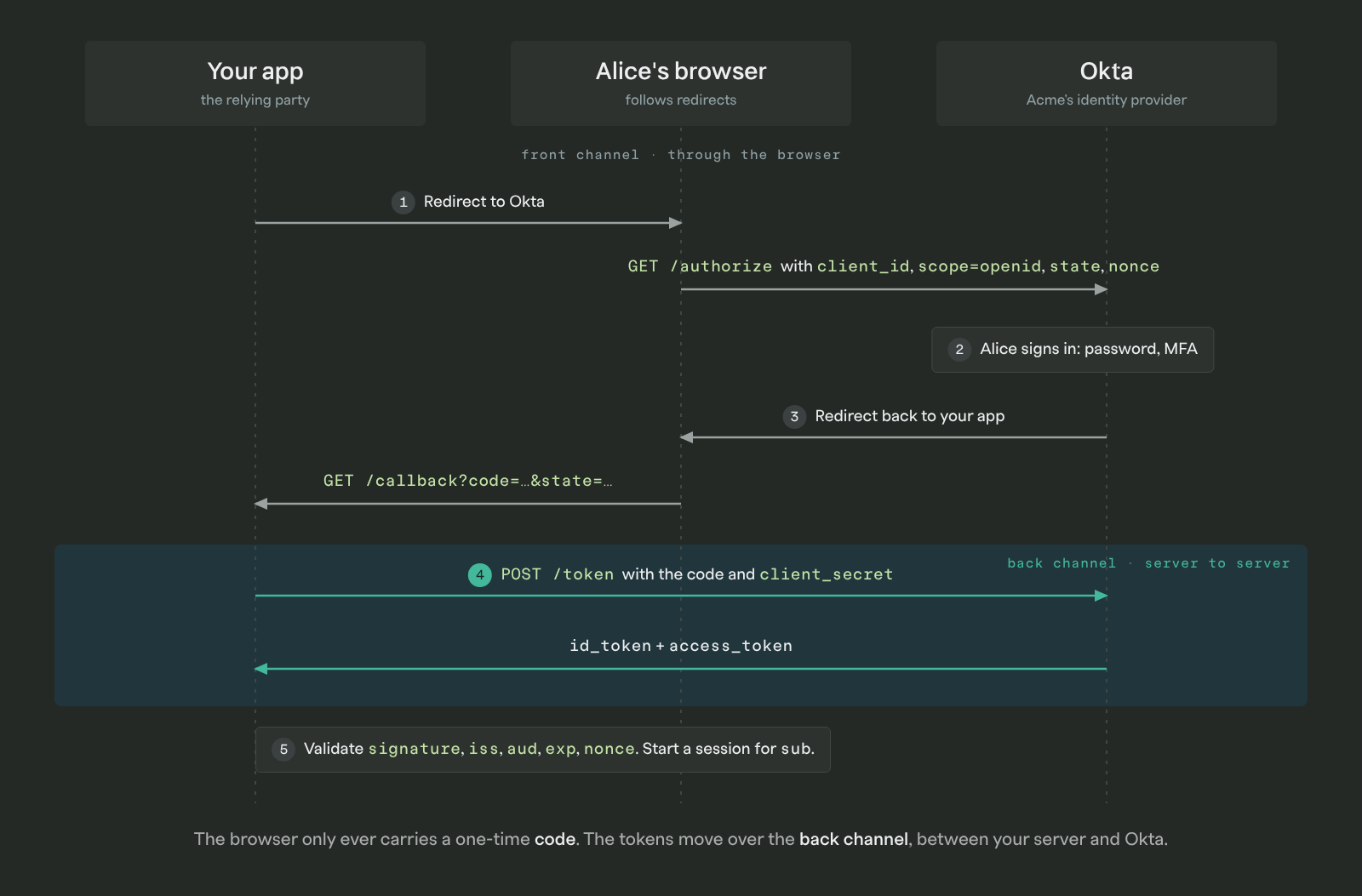
Step 4 is the one that makes this secure, and it's the part the DMV model skipped. The browser only ever carries a one-time code. The tokens travel over a back channel between your server and the IdP, where nothing in Alice's browser history or a referrer header can leak them.
What about a single-page app or a mobile app that can't keep a client_secret? Use the same Authorization Code flow with PKCE, which replaces the secret with a one-time proof. The spec also defines an older Implicit flow that returns tokens straight to the browser. It was deprecated for exactly the leakage reasons above, so don't use it.
One more piece worth knowing: every OIDC provider publishes a discovery document at /.well-known/openid-configuration. It lists the authorization endpoint, the token endpoint, the URL for the signing keys (the JWKS), and the scopes and algorithms the provider supports. Most OIDC client libraries read it automatically, which is a big part of why OIDC integrations tend to go faster than SAML ones.
What's Inside an ID Token?
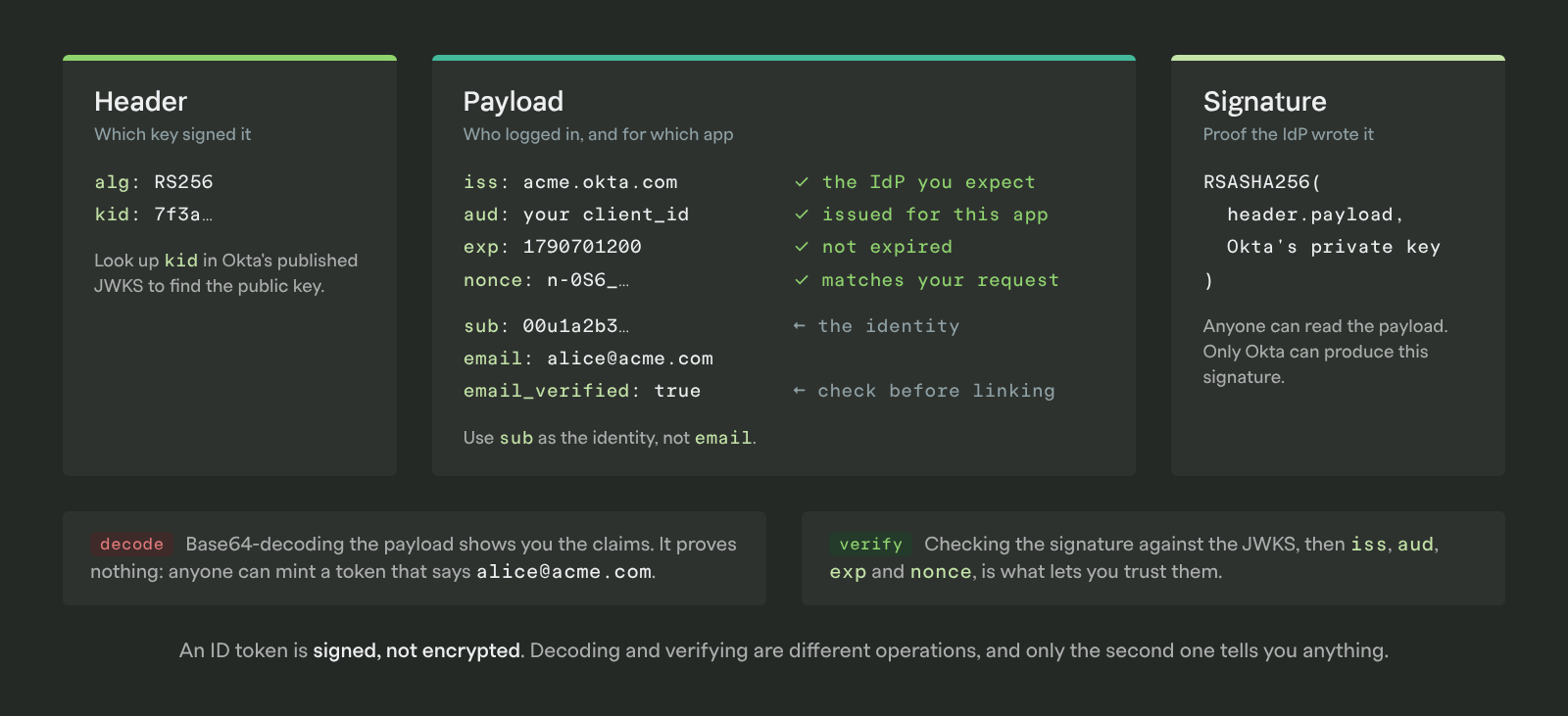
Back to the sealed note. In OIDC it's a JWT: three base64url-encoded segments separated by dots, a header, a payload, and a signature. (If JWTs are new to you, we take one apart with runnable code in JWT Authentication Explained with Code Examples.) Decode the payload of the token Alice brought back and you'd see something like this:
{
  "iss": "https://acme.okta.com",
  "sub": "00u1a2b3c4d5e6f7g8h9",
  "aud": "0oa9z8y7x6w5v4u3t2s1",
  "exp": 1790701200,
  "iat": 1790697600,
  "nonce": "n-0S6_WzA2Mj",
  "email": "alice@acme.com",
  "email_verified": true,
  "name": "Alice Chen"
}
The claims that matter most, and what to do with each:
| Claim | What it is | What you do with it |
|---|---|---|
iss | Issuer: the IdP that minted the token | Reject the token if it isn't the IdP you expect |
sub | Subject: a stable, unique ID for this user at this IdP | Use this as the user's identity. Not email; emails change and aren't guaranteed unique across IdPs |
aud | Audience: your app's client_id | Reject the token if it was issued for a different app |
exp / iat | Expiry and issued-at, as Unix timestamps | Reject expired tokens; most IdPs issue ID tokens that expire in an hour or less |
nonce | A random value your app sent in the initial request | Check it matches, to prevent replay |
email, name, picture | Standard profile claims, present if you asked for the email and profile scopes | Populate the user's record |
Two properties of the ID token trip people up.
First, the ID token is signed, not encrypted. (The spec allows encrypting it too, but almost nobody does.) The signature proves the DMV wrote the note. It doesn't stop anyone from reading it. Decoding a JWT and verifying a JWT are different operations, and only the second one tells you anything.
Second, the ID token is not an API credential. It proves who logged in. Your app consumes it once, starts a session, and moves on. Calling someone else's API with it is using the DMV's note as a credit card.
OIDC vs. SAML: What's the Difference?
From Alice's seat, OIDC and SAML look identical: click a button, authenticate at the IdP, land back in the app. The differences are in how they're built, who already uses them, and how much work they are for your team. (We walk through the SAML side in the same depth in Understanding SAML and SCIM.)
| SAML 2.0 | OIDC | |
|---|---|---|
| Released | 2005 | 2014 |
| Built on | XML and SOAP-era web standards | OAuth 2.0, JSON, REST |
| Token format | XML assertion, signed with XML-DSig | JWT (ID token) |
| Transport | Browser POST of a large base64 XML blob | Redirect with a short code, then a back-channel HTTPS call |
| Client discovery | Manual metadata exchange (upload an XML file) | Automatic via /.well-known/openid-configuration |
| Mobile and SPA support | Awkward; built for browser form posts | Native; Authorization Code + PKCE is designed for it |
| API access | Not in scope | Built in; you get an access token with the ID token |
| Where you'll see it | Enterprise IdPs: Okta, Entra ID, Ping, ADFS | Consumer login (Google, Apple, Microsoft) and increasingly enterprise IdPs |
| Implementation difficulty | Higher: XML parsing, canonicalization, and signature verification have a long history of bugs | Lower: JWT libraries are mature and small |
Use SAML when the customer tells you to. Large enterprises with established IdP setups often have SAML configured for everything and will expect you to support it. Security questionnaires still ask "Do you support SAML?" far more often than they ask about OIDC.
Use OIDC for everything else. Social login is OIDC. Mobile and single-page apps are far easier with OIDC. Most major IdPs offer it alongside SAML, and newer integrations increasingly default to it. If you're starting from scratch and get to choose, OIDC is simpler and harder to get wrong.
In practice, a B2B product ends up supporting both. Your self-serve customers want "Sign in with Google." Your enterprise customers send you a SAML metadata file. The good news is they coexist cleanly: both produce a verified identity, and once the login is done, the rest of your app doesn't need to know which protocol was used. Neither one handles creating or removing accounts, by the way. That's SCIM, which runs alongside either.
Do You Need OIDC Yet?
You may already have it. If your app offers "Sign in with Google" or "Sign in with Microsoft," that's OIDC, and a library is handling the flow above for you. (GitHub is the notable holdout for user login: it's plain OAuth 2.0 with a user-info API bolted on, which is exactly the pattern OIDC was created to standardize.)
The version that takes real work is per-customer OIDC: letting Acme connect its own Okta tenant, and Globex connect its own Entra ID tenant, so each company's employees log in through their own IdP. That's enterprise SSO, and you'll know you need it when:
- A prospect's security questionnaire asks "Do you support SSO with our identity provider?"
- A customer's IT admin asks for an OIDC or SAML setup guide
- A deal stalls on "we can't roll this out to 200 people without SSO"
If none of that has happened, you likely don't need it yet. Keep social login and come back when a customer asks.
Outside of login, you'll also meet OIDC in a few places worth recognizing: it's how kubectl authenticates against many Kubernetes clusters, how a CI job proves its identity to AWS or GCP without long-lived keys (workload identity), and it shows up in the MCP authorization spec, which is built on OAuth 2.1 and reuses OpenID Connect Discovery to locate the authorization server's endpoints.
Common OIDC Mistakes
OIDC is simpler than SAML, which is not the same as easy. These are the mistakes that come up repeatedly in code review and in breach write-ups.
Skipping ID token validation. It came back from the token endpoint over HTTPS, so it's tempting to trust it. Validate it anyway: signature, iss, aud, exp, and nonce. The whole model rests on your app checking the DMV's signature, not on the note having arrived in a sealed envelope.
Using email as the user identifier. Use sub. Emails change, get reassigned, and two different IdPs can both vouch for the same address. sub is unique per user per IdP, and the pair (iss, sub) is unique everywhere.
Trusting email without checking email_verified. Some IdPs will return an email claim for an address the user never confirmed. If you auto-link accounts by email, that's an account takeover waiting to happen.
Treating the ID token as an API credential. The ID token tells your app who logged in. Sending it to a third-party API is wrong; that's what the access token is for.
Using the Implicit flow. It leaks tokens into browser history and referrer headers. Use Authorization Code with PKCE, for SPAs and mobile too.
Hardcoding endpoints instead of using discovery. Providers rotate keys and occasionally move endpoints. Read /.well-known/openid-configuration and the JWKS URL it points to, and cache with a sensible TTL.
Ignoring state. It's the CSRF protection for the login flow. Generate it per request, store it in the session, and check it on the callback.
Where PropelAuth Fits
Everything above is the protocol. What turns it into a feature your enterprise customers can use is the layer around it, and that's where most of the engineering time goes:
- Per-customer IdP configuration, so Acme can connect its Okta and Globex its Entra ID
- Supporting SAML next to OIDC, because your customers won't all pick the same one
- Mapping the identity you get back to the right organization in your app, and making sure someone from
acme.comcan't land in Globex's workspace - Carrying roles and attributes from the IdP into your app's permissions
- Session management, refresh, logout, and the edge cases the spec leaves to you
PropelAuth handles OIDC authentication and SAML as part of Enterprise SSO, built around organizations from the start. Acme's IT admin configures their own IdP through a guided setup flow in the hosted organization settings (or through a setup link you send them), and a user who logged in via OIDC, SAML, social login, or password shows up the same way in your code: as a member of an organization with roles. Your application still owns what those roles are allowed to do; PropelAuth tells you who's asking and which organization they belong to. Add SCIM and account provisioning is handled too.
Frequently Asked Questions
Is OIDC the same as OAuth? No. OAuth 2.0 is an authorization framework; OIDC is an authentication layer built on top of it. OIDC uses OAuth's flows and adds the openid scope and the ID token. Every OIDC login is an OAuth flow, but most OAuth flows are not OIDC.
Is OIDC the same as SSO? SSO is the outcome: log in once, use many apps. OIDC and SAML are two protocols that deliver it. When an enterprise customer says "SSO," they usually mean SAML, but OIDC-based SSO is increasingly common.
Is OIDC replacing SAML? Slowly. New integrations lean toward OIDC because it's simpler and works better with mobile and single-page apps, but SAML has twenty years of enterprise deployment behind it and isn't going anywhere soon. Most B2B products end up supporting both.
Is an ID token a JWT? Yes, always. The OIDC spec requires it. Access tokens can be JWTs or opaque strings, depending on the provider.
Do I need OIDC for API authentication? Not directly. OIDC is for logging users in. Once a user is logged in, your app issues its own session or API tokens. For machine-to-machine access, you'd typically use OAuth 2.0 client credentials or API keys rather than OIDC.
Does PropelAuth support OIDC? Yes. PropelAuth added OIDC connections for enterprise SSO alongside SAML, and supports OIDC-based social login with Google, Microsoft, and others. Enterprise connections are configured per organization, and your customers can set up their own IdP without you writing integration code.